Please note that we are not a nationwide support helpline and can only provide assistance to our existing customers.
However, please feel free to browse our help sections, where you will find useful guides, videos and information that may help you with your DMSS requirements.
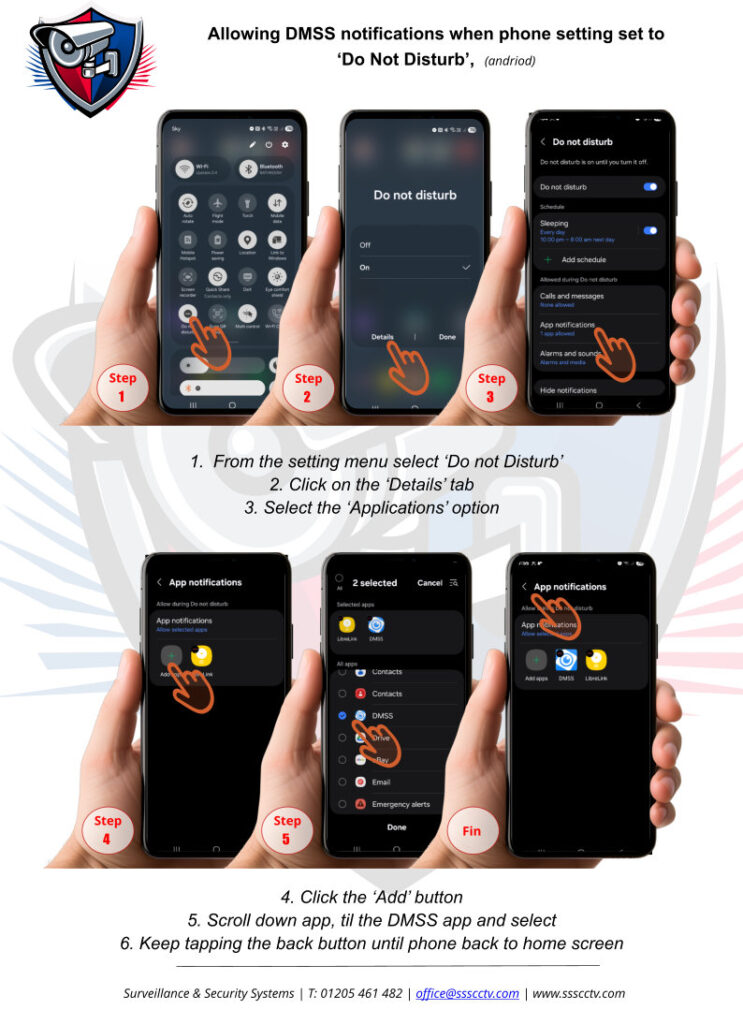
At the beginning of 2026 Dahua changed the way the DMSS app works, below are just some help files/videos to help you through the change 😉

DMSS,“Digital Mobile Surveillance System.“
Online Manual
An app developed by ‘Dahua Technology’ designed for remote surveillance management, allowing users to integrate with Dahua’s surveillance products.
Get APP here: Play Store, (Android) or Apple Store
I am unable to access my cameras on the DMSS app after switching to a new internet provider and router.
When you add a new router, your internet IP address often changes because the network device connecting you to your Internet Service Provider (ISP) has changed.
- If the recorder appears offline, disconnect it from its power supply, then reconnect it. Doing so forces the recorder to obtain a new IP address, which should bring it back online.
I’m unable to view my IP cameras on the TV monitor or through the app after switching to a new internet provider and router.
When you add a new router, your internet IP address often changes because the network device connecting you to your Internet Service Provider (ISP) has changed.
- If your IP cameras are offline, it is likely because they were assigned fixed IP addresses that are no longer valid with your new router. You will need to contact us to arrange a call-out so we can reconfigure the camera IP addresses to work with your new router. Please note a callout fee shall apply 😉